

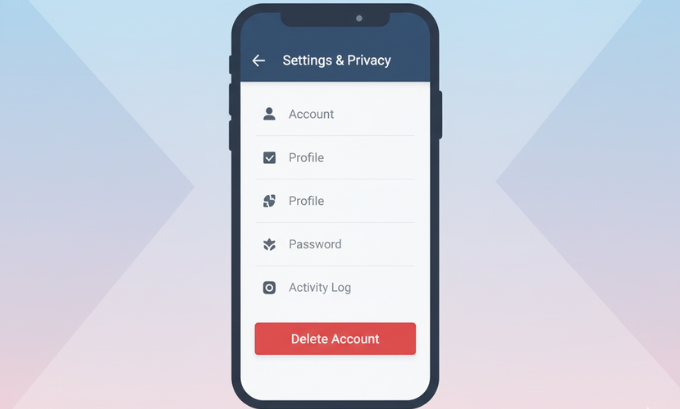
Deleting or deactivating your Facebook account can seem daunting, but it’s a straightforward process once you know the steps. Whether you’re taking a temporary break or making a permanent exit, this guide walks you through both options—including what happens to your data, how it affects connected apps, and what you need to know before making the change.
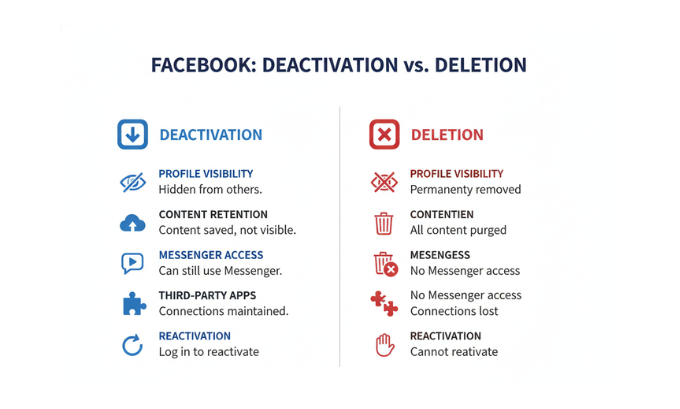
The key difference: deactivation temporarily hides your profile while preserving your data for future reactivation, while permanent deletion removes your account and data after a 30-day grace period.
Table of Contents
Understanding Your Options: Delete vs. Deactivate
Before diving into the steps, it’s important to understand the two main ways to remove your Facebook presence and their implications for your digital life.
Deactivating Your Facebook Account
Deactivation is like putting your account on pause. Your profile becomes invisible to other users, but Facebook keeps all your data intact. You can reactivate anytime simply by logging back in. This option works well if you need a temporary break from social media or want to step away without losing years of photos and memories.
When you deactivate:
- Your profile disappears from search results
- Friends can’t tag you in posts
- Your timeline and posts become hidden
- Messenger remains active unless you deactivate it separately
- Connected apps may lose access to your Facebook data
Permanently Deleting Your Facebook Account
Permanent deletion means goodbye forever. After a 30-day waiting period, Facebook removes your account and most associated data. This option suits users who want to completely disconnect from the platform due to privacy concerns, digital minimalism, or simply moving on from social media.
When you delete permanently:
- All your data gets erased after 30 days (with some exceptions)
- You lose access to any apps using Facebook Login
- Connected services like Instagram may be affected
- Recovery becomes impossible after the grace period
For users wanting to understand more about cybersecurity trends for 2025, it’s worth noting that data privacy concerns are driving many people to reconsider their social media presence entirely.
Step-by-Step: How to Deactivate Your Facebook Account
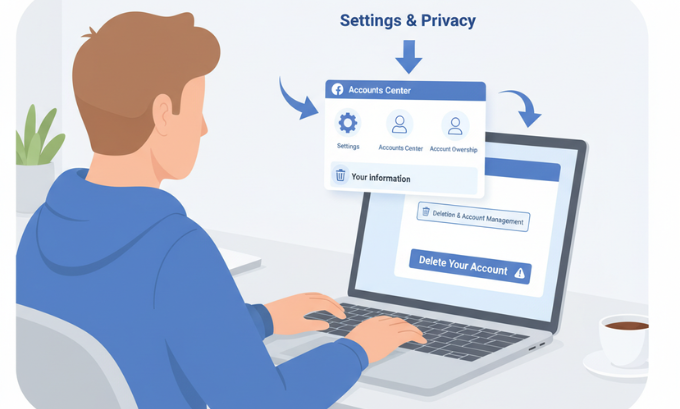
Method 1: Using Facebook’s Accounts Center
Facebook’s Accounts Center provides a centralized way to manage all your Meta products, including Facebook, Instagram, and WhatsApp.
- Access Accounts Center: Go to facebook.com and click the dropdown arrow in the top-right corner
- Navigate to Settings: Select “Settings & Privacy,” then “Settings”
- Find Your Information: Look for “Your Facebook Information” in the left sidebar
- Select Deactivation: Click “Deactivation and Deletion”
- Choose Your Option: Select “Deactivate Account” and click “Continue to Account Deactivation”
- Follow the Prompts: Facebook will ask why you’re leaving and may suggest alternatives
- Confirm Deactivation: Enter your password and click “Deactivate”
Method 2: Direct Account Settings Route
For users who prefer a more direct approach:
- Settings Menu: Click the dropdown arrow and select “Settings & Privacy”
- Account Ownership: Navigate to “Account Ownership and Control”
- Deactivation Option: Select “Deactivation and Deletion”
- Complete Process: Follow the same confirmation steps as Method 1
Remember to consider whether you want to keep Facebook Messenger active, as this requires a separate deactivation process if you want to disable messaging completely.
Step-by-Step: How to Permanently Delete Your Facebook Account
The 30-Day Safety Net
Facebook provides a 30-day grace period for permanent deletions. During this time, your account remains recoverable if you change your mind. Simply log in within 30 days to cancel the deletion process.
Deletion Process
- Access Deletion Settings: Follow the same path as deactivation (Settings → Your Facebook Information → Deactivation and Deletion)
- Select Permanent Deletion: Choose “Delete Account” instead of deactivate
- Review the Consequences: Facebook will explain what gets deleted and what remains
- Confirm Your Decision: Enter your password and click “Delete Account”
- Stay Offline: Avoid logging in for 30 days to complete the process
What Happens During the 30-Day Period
- Your profile becomes invisible to other users
- Most of your data gets marked for deletion
- Recovery remains possible by simply logging in
- Some information may still appear in messages you sent to others
- Apps using Facebook Login will lose access to your data
For those interested in learning more about data protection and online privacy, resources about digital transformation strategies can provide valuable insights into managing your digital footprint.
Before You Delete: Important Considerations
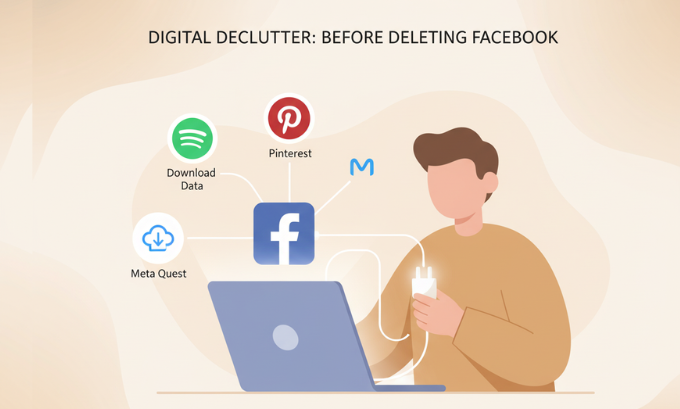
Download Your Data
Before deleting your account, consider downloading a copy of your Facebook data. This includes photos, posts, messages, and other information you might want to keep.
- Access Download Tool: Go to Settings → Your Facebook Information → Download Your Information
- Select Data Range: Choose date range and data quality (high quality takes longer)
- Choose Format: Select HTML for easy viewing or JSON for data portability
- Request Download: Facebook will email you when your file is ready
Connected Apps and Services
Many users don’t realize how extensively Facebook Login integrates with other services. Before deleting, review:
- Spotify: May lose playlists and social features
- Pinterest: Could affect account access and social connections
- Dating apps: Many require Facebook verification
- Games and apps: Progress and social features may be lost
Business and Page Management
If you manage Facebook Pages or business accounts, ensure other administrators are in place before deleting your personal account. Page ownership can transfer, but the process requires advance planning.
Meta Quest and VR Considerations
For Meta Quest users, deleting your Facebook account affects your VR experience. Consider:
- Game purchases and progress
- Social VR features
- Oculus Store access
The relationship between Facebook accounts and Meta Quest devices has evolved, but connectivity remains important for full functionality.
What Remains After Deletion
Even after permanent deletion, some traces of your Facebook presence may persist:
Information That May Remain Visible
- Messages sent to others: Recipients keep copies of conversations
- Comments on others’ posts: May remain visible with your name
- Photos others tagged you in: The tags disappear, but photos remain
- Business transactions: Records of purchases through Facebook may persist for legal compliance
Data Facebook Retains
Facebook may retain certain data for legal and operational purposes:
- Legal compliance data: Required by law enforcement or regulations
- Anonymous usage data: Aggregated statistics without personal identifiers
- Technical logs: Server logs for security and operational purposes
This data retention aligns with broader cybersecurity trends 2025, where companies balance user privacy with legal compliance requirements.
Alternative Solutions Before Going Nuclear
Customize Your Privacy Settings
Instead of deleting entirely, consider adjusting your privacy settings:
- Limit who can see your posts and information
- Restrict data sharing with third-party apps
- Turn off targeted advertising
- Limit friend requests and messages
Clean Up Your Digital Life
Sometimes a thorough cleanup achieves your goals without deletion:
- Unfriend or unfollow accounts that don’t add value
- Delete old posts and photos you no longer want public
- Leave groups that no longer interest you
- Update your interests and preferences
Take a Scheduled Break
Facebook offers tools for temporary breaks without full deactivation:
- Unfollow friends temporarily without unfriending
- Snooze people or pages for 30 days
- Turn off notifications to reduce engagement triggers
For users exploring alternatives to traditional social media, understanding consumer electronics show 2025 trends can provide insight into emerging digital communication platforms.
Special Considerations for Different User Types
Content Creators and Influencers
If you’ve built an audience on Facebook, consider:
- Migration strategy: Move followers to other platforms first
- Content backup: Download all your creative work
- Alternative platforms: Establish presence on Instagram, TikTok, or LinkedIn
- Professional impact: Consider how deletion affects your personal brand
Business Owners
Business accounts require additional planning:
- Transfer page ownership to other team members
- Update website links and remove Facebook integration
- Consider professional alternatives like LinkedIn for networking
- Backup customer data and contact information
Privacy-Conscious Users
For users primarily motivated by privacy concerns:
- Review data download thoroughly before deletion
- Consider gradual withdrawal instead of immediate deletion
- Explore privacy-focused alternatives like Signal for messaging
- Understand that deletion doesn’t guarantee complete data removal
Recovery and Reactivation
Recovering a Deactivated Account
Reactivating a deactivated account is straightforward:
- Simply log in with your email and password
- Your profile reappears exactly as you left it
- All friends, photos, and posts return immediately
- Messenger conversations resume normally
Recovering a Deleted Account (Within 30 Days)
If you change your mind during the grace period:
- Log in normally within 30 days
- Facebook will ask if you want to cancel the deletion
- Confirm cancellation to restore your account
- All data returns as if nothing happened
After 30 Days: No Recovery Possible
Once the grace period expires, recovery becomes impossible. Facebook permanently removes your data, and you’ll need to create an entirely new account if you want to return.
Privacy and Data Considerations in 2025
The Evolving Privacy Landscape
As cybersecurity trends for 2025 continue evolving, user awareness of data privacy has increased significantly. Many users now view social media deletion as part of a broader digital privacy strategy.
Understanding Data Portability
The concept of data portability—your right to take your data with you—has become increasingly important. Facebook’s download tools represent this principle in action, allowing users to maintain control over their digital memories even when leaving the platform.
Shadow AI and Your Data
With the rise of Shadow AI—unauthorized AI systems trained on user data—many users worry about how their social media information might be used. Deleting your Facebook account removes one potential source of personal data for such systems.
Frequently Asked Questions
What’s the difference between deleting and deactivating my Facebook account?
Deactivation temporarily hides your profile while preserving all data for future reactivation. Deletion permanently removes your account and data after a 30-day grace period, with no possibility of recovery afterward.
Will deleting Facebook affect my Instagram or WhatsApp accounts?
Not directly, but since all three platforms are owned by Meta, some integrated features may be affected. Instagram and WhatsApp accounts remain active independently, though some cross-platform features may stop working.
How long does it take to permanently delete a Facebook account?
Facebook provides a 30-day grace period during which you can cancel the deletion by logging in. After 30 days, the deletion becomes permanent and irreversible.
Can I delete Facebook but keep Messenger?
No, Facebook Messenger requires an active Facebook account to function. However, you can deactivate your Facebook profile while keeping Messenger active, which hides your profile but maintains messaging capabilities.
What happens to Facebook Pages I manage if I delete my account?
If you’re the only administrator of Facebook Pages, you should add other administrators before deleting your account. Pages without administrators may become inaccessible.
Will my Meta Quest VR headset still work if I delete Facebook?
Your Meta Quest device will continue to function, but social features and some integrated services may be affected. Check Meta’s current requirements for VR devices, as policies continue evolving.
Can I recover my account after permanent deletion?
No. Once the 30-day grace period expires, Facebook permanently removes your data and account recovery becomes impossible. You would need to create an entirely new account.
What data does Facebook keep after I delete my account?
Facebook may retain some data for legal compliance, security purposes, and operational needs. However, your personal profile, posts, photos, and most identifying information get permanently deleted after the grace period.
How does account deletion affect apps that use Facebook Login?
Apps using Facebook Login will lose access to your Facebook data and may require you to create new accounts using email or alternative login methods. Services like Spotify and Pinterest often offer multiple login options.
Should I download my data before deleting my account?
Yes, downloading your Facebook data is recommended if you want to preserve photos, posts, messages, or other information. This process takes time, so start it before initiating account deletion.

Making the Right Choice for Your Digital Future
Deciding whether to delete your Facebook account is deeply personal. For some, it represents freedom from social media’s demands and privacy concerns. For others, it means losing valuable connections and memories built over years of use.
The most important factor is understanding your motivations and the full consequences of your choice. Whether you’re concerned about data privacy trends, seeking digital minimalism, or simply taking a break from social media, Facebook provides options to match your needs.
Remember that this decision isn’t necessarily permanent if you choose deactivation, and even deletion offers a 30-day safety net. Take time to consider your options, backup any important data, and ensure you understand how the change will affect your connected apps and services.
The digital landscape continues evolving rapidly, with new platforms and privacy regulations constantly emerging. Whatever you choose regarding Facebook, staying informed about digital trends and privacy developments will help you make better decisions about your online presence going forward.
Your digital wellbeing matters, and taking control of your social media presence—whether through deletion, deactivation, or simply better privacy settings—is a positive step toward a more intentional relationship with technology.
